Wednesday, September 24, 2025

Zoho Cliq AI Meeting Transcripts: Inclusive, Real-Time, and Actionable

What if your next meeting didn't just include everyone—it empowered everyone? In a world where hybrid workplaces and global teams are the norm, the real challenge isn't just bringing people together, but ensuring every voice is heard and every idea captured. AI at work is transforming this reality, using live transcripts and real-time transcription to break through the barriers of traditional and virtual meetings.

The New Frontier of Meeting Accessibility

Think about the last time a fast-paced discussion left someone behind. Was it due to a patchy internet connection, a heavy accent, or simply the speed of conversation? For remote participants, especially those who are deaf or hard of hearing, these aren't just inconveniences—they're obstacles to full participation. In today's online meetings, where decisions are made in minutes and teams stretch across time zones, even a single missed point can disrupt team collaboration and dilute business outcomes.

AI-powered meetings are rewriting these dynamics. By delivering live transcripts instantly, every participant can read along, revisit complex points, and contribute with confidence. This is more than a technical upgrade—it's a shift toward true workplace inclusion and digital accessibility. When teams can leverage AI agents as digital employees, they create environments where technology actively supports human potential rather than limiting it.

Beyond Convenience: The Strategic Value of Live Transcripts

Why does this matter for your business? Consider these dimensions:

  • Inclusivity: Accents, language differences, and hearing impairments no longer limit engagement. Every team member, regardless of geography or ability, can follow and contribute in real time through advanced AI reasoning capabilities that adapt to diverse communication styles.
  • Meeting productivity: Freed from the distraction of note-taking, participants can focus on meaningful dialogue, while AI-generated transcripts provide a complete, searchable record for those who couldn't attend. This approach mirrors the efficiency gains outlined in hyperautomation strategies that streamline business processes.
  • Accountability and knowledge management: With transcripts, action items and decisions are transparent, traceable, and easy to reference—minimizing miscommunication and boosting team morale. Organizations can build comprehensive knowledge management systems that capture institutional wisdom.
  • Content creation: Meeting transcripts become a goldmine for repurposing—fueling blog posts, video scripts, or knowledge base articles without starting from scratch. Teams can utilize AI voice generation tools to transform written content into engaging audio formats.

The Next Evolution: Contextualized, Action-Oriented Meetings

Imagine if your meeting didn't just end with a transcript, but with AI automatically linking discussion points to projects, tasks, or workflows. Every idea instantly becomes actionable, feeding directly into your business platforms through intelligent automation systems. This is the future of meeting technology—where AI doesn't just record, but orchestrates the next steps, driving productivity and innovation.

Building the Future with Zoho Cliq

At Zoho Cliq, these possibilities aren't distant ambitions—they're the foundation of our product vision. Our AI-powered meeting transcripts, summaries, and action items are designed to help teams cut through noise and focus on what matters. The goal isn't just more features, but a seamless, inclusive experience where every participant—be it a new hire, a remote worker, or a global team member—can engage, contribute, and stay aligned.

Provocative Questions for Leaders:

  • Are your current communication tools truly inclusive, or do they leave some team members behind?
  • How much productivity is lost when your team spends more time clarifying what was discussed than acting on what was decided?
  • What competitive advantage could you unlock if every meeting became a searchable, actionable asset for your organization?

Vision: From Meetings to Momentum

As AI evolves, meetings will cease to be isolated events and instead become interconnected engines of progress—where every conversation builds organizational knowledge, drives action, and fosters a culture of inclusion. The question is no longer "Can we capture what was said?" but "How can we ensure every meeting moves us forward?"

AI at work is not just about better meetings—it's about building a smarter, more connected, and truly inclusive workplace. Will your organization lead the way?

What are live transcripts and how do they improve meetings?

Live transcripts are real-time, automatically generated text versions of spoken meeting content. They improve meetings by making conversations searchable, helping participants follow fast or accented speech, providing accessibility for deaf or hard-of-hearing attendees, and freeing people from note-taking so they can engage more fully.

How do AI-powered transcripts help with inclusivity?

AI-powered transcripts reduce barriers caused by accents, language differences, poor connectivity, and hearing impairments by providing a readable, real-time record of the conversation. This enables all participants to follow discussions, contribute confidently, and ensures meetings are accessible regardless of location or ability.

How accurate are real-time transcripts and can they be improved?

Accuracy varies with audio quality, speakers’ clarity, accents, and background noise. Accuracy can be improved with better microphones, noise suppression, speaker separation, model fine-tuning for domain-specific terms, and allowing users to correct and train the system over time.

Can AI automatically create action items and link them to tasks?

Yes. Advanced meeting AI can identify decisions, assignments, and next steps from transcripts and surface them as action items. These can be linked to project management or workflow systems so discussions directly translate into tasks, due dates, and responsible owners.

What are the privacy and security considerations for storing meeting transcripts?

Key considerations include data encryption in transit and at rest, access controls, retention policies, role-based permissions, compliance with regional regulations (e.g., GDPR), and transparent user consent. Organizations should evaluate vendor security practices and configure settings to limit who can access and export transcripts.

Which teams benefit most from AI-driven meeting transcripts?

Virtually any team benefits, especially distributed or hybrid teams, customer support, product and engineering (for recording technical decisions), HR and recruiting (for inclusive interviews), and knowledge-management teams that repurpose meeting content into documentation, training, or marketing materials.

How do transcripts support knowledge management and content creation?

Transcripts create searchable records that capture institutional knowledge and decisions. They can be indexed into knowledge bases, summarized into articles, converted into blog posts or video scripts, and transformed into audio using voice-generation tools—reducing content-creation time and preserving organizational memory.

Do real-time transcripts support multiple languages and translations?

Many AI transcription systems support multiple languages and can provide live translations or post-meeting translated transcripts. Support levels vary by vendor and language pair; for best results, choose a solution with strong multilingual models and the ability to customize or add terminology specific to your business.

How do I implement AI meeting transcripts in my organization?

Start by assessing needs (accessibility, compliance, integrations), pilot with a small team, evaluate audio quality and model accuracy, integrate with calendars and collaboration tools, set retention and access policies, and train users on features like corrections and action-item generation. Iterate based on feedback before wider rollout.

How does Zoho Cliq use AI to enhance meetings?

Zoho Cliq integrates AI to provide live transcripts, meeting summaries, and identified action items that help teams focus on discussion rather than note-taking. Its vision is to make meetings more inclusive, searchable, and directly connected to workflows so conversations become actionable organizational assets.

What ROI can organizations expect from adopting real-time transcription?

ROI comes from increased productivity (less time spent clarifying or taking notes), faster execution of decisions via actionable follow-ups, improved inclusion and participation, reduced meeting repetition, and repurposed content for training and marketing. Quantifying gains depends on meeting volume, team size, and how transcripts are used.

Can participants edit or correct transcripts after a meeting?

Yes. Most platforms allow users to review, edit, and annotate transcripts post-meeting. Corrections can improve future accuracy if the system supports learning from user edits, and edited transcripts can be exported or integrated into knowledge bases and task systems.

Fix Zoho CRM PDF Template Breaks with Zoho Office Integrator for Reliable Proposals

What if your most ambitious proposal document—the one meant to impress clients and drive deals—never reaches its full potential because of a hidden technical barrier? For many business leaders, the challenge of PDF import and template creation within Zoho CRM is more than a minor inconvenience; it's a strategic bottleneck that undermines the promise of digital transformation.

Today's market demands seamless document workflows where data from Accounts, Contacts, and Deals flows effortlessly into beautifully designed, on-brand proposal templates. Yet, when you attempt template importing using PDFs created in platforms like Adobe InDesign, you may find the resulting template appearance is distorted, unusable, or simply fails to reflect your brand vision. This isn't just a formatting problem—it's a symptom of deeper integration challenges and software compatibility issues that can stall business agility.

Why does this happen? Zoho CRM's Merge Templates and related document modules offer PDF template import options, but their PDF compatibility is limited. The rendering engine may not fully support complex layouts or design elements produced by advanced PDF creation software like InDesign. The result: your carefully crafted proposal document loses its impact, forcing you to consider costly third party software or manual workarounds—draining both time and resources.

But what's the strategic implication? When your document generation process is fragmented—relying on external tools, manual data entry, or subpar template design—you risk inefficiencies, errors, and missed opportunities for CRM integration. The inability to leverage template functionality directly from Zoho CRM means your sales, marketing, and operations teams can't fully automate or personalize communications at scale. In a landscape where customer experience is king, these import problems can erode your competitive edge.

So, what can you do? Forward-thinking organizations are exploring solutions that bridge the gap between document templates and data integration. Tools like Zoho Office Integrator offer APIs for deeper document creation and editing, enabling real-time collaboration and more flexible template formatting—potentially bypassing the limitations of native PDF import. Others leverage integrations with platforms like PandaDoc to pull CRM data directly into dynamic templates, ensuring consistency and reducing manual effort.

Here are key questions to consider as you rethink your template importing strategy:

  • How much business value is lost every time your proposal workflow hits a technical snag?
  • What is the cost—both financial and reputational—of relying on third party software for core business documents?
  • Could investing in more robust template integration solutions unlock new levels of automation and personalization for your team?

The future of document workflows isn't just about solving formatting problems; it's about enabling your organization to move at the speed of business. As digital transformation accelerates, your ability to create, format, and deploy proposal templates that seamlessly integrate with CRM data will be a defining factor in your success.

Modern businesses are discovering that advanced automation workflows can eliminate many of these document bottlenecks entirely. By implementing comprehensive integration strategies, organizations can create seamless data flows that automatically populate professional documents without the traditional PDF import limitations.

For teams seeking immediate solutions, Make.com provides powerful automation capabilities that can bridge the gap between your CRM data and document generation needs. This approach allows you to maintain design integrity while ensuring data accuracy across all your business communications.

Are you ready to transform your document workflows from a source of frustration into a strategic asset? The answer may lie in reimagining how your organization approaches PDF conversion, template compatibility, and the broader vision for integrated, automated business communications.

Why do PDFs created in Adobe InDesign look distorted when imported into Zoho CRM merge templates?

Zoho's PDF rendering engine has limited support for advanced PDF features (complex layers, transparency, embedded objects, proprietary fonts and certain color profiles) that InDesign can produce. When these features are present the import can restructure or rasterize elements, shifting layout, fonts, and overall appearance.

What are quick fixes to improve PDF import compatibility?

Export a simplified PDF: flatten layers, embed or subset fonts, convert colors to RGB, avoid transparency and non-standard objects, or export as PDF/X. Alternatively recreate the layout in a supported format (Word/HTML) or export complex parts as high-resolution images and insert them into a simpler template.

When should I use a third-party document tool (PandaDoc, Make.com) instead of native Zoho templates?

Use third-party tools when you need advanced layout fidelity, dynamic interactive elements, e-signatures, richer styling, or easier data mapping from CRM. They’re also appropriate when automation, revision tracking, and collaboration across departments must scale beyond native merge capabilities.

Can Zoho Office Integrator or APIs solve PDF import limitations?

Yes — Zoho Office Integrator and Zoho APIs provide more flexible document creation/editing capabilities and programmatic control to build templates from structured data, avoid problematic PDF rendering, and enable real-time collaboration. They are good options if you want deeper integration without relying solely on PDF import.

What’s the best way to map CRM fields (Accounts, Contacts, Deals) into proposal templates?

Use the template merge/tag feature or an integration tool to map fields directly to placeholders. Maintain consistent field naming, test mappings with sample records, and build fallback logic for missing data. For complex mappings, use automation platforms or custom functions to pre-format data before merging.

How can automation eliminate document bottlenecks?

Automations (Zoho Flow, Make.com, custom scripts) can pull CRM data, populate templates, trigger approval workflows, and deliver final proposals. This reduces manual copying, minimizes errors, speeds delivery, and enables personalization at scale while preserving brand design when templates are created in compatible formats or via APIs.

Are there security or compliance concerns when using third‑party document services?

Yes. Evaluate data residency, encryption (in‑transit and at‑rest), access controls, audit logs, and vendor compliance certifications (e.g., SOC2, GDPR). Ensure integrations maintain CRM permission models and that sensitive fields are masked or excluded when appropriate.

What are practical template design best practices to avoid import issues?

Design with simplicity: use web-safe or embedded fonts, avoid layered effects and transparency, keep complex graphics as images, use consistent margins and spacing, and test exports at different settings. Prefer editable Word/HTML templates for dynamic text and reserve high-fidelity PDFs for final, non-merged assets.

How should I evaluate the cost vs. benefit of upgrading my document workflow?

Measure time saved per document, reduction in errors, conversion lift from faster personalized proposals, and avoided manual work. Compare subscription/custom integration costs and implementation time against long-term efficiency gains and revenue impact to determine ROI.

What troubleshooting steps should I take when a template import fails?

1) Export a simplified PDF (flatten, embed fonts); 2) Test importing a single-page sample; 3) Replace complex elements with images; 4) Try alternative formats (DOCX/HTML) or building template inside Zoho; 5) Use integration/API approach if native import still fails; 6) Contact support with sample files and screenshots.

Is it better to recreate templates in Zoho or integrate an external document platform?

If your templates require simple merge fields and incremental design, recreating in Zoho is cost-effective. If you require pixel-perfect design, advanced interactivity, or robust approval/e-signature workflows, an external platform with tight CRM integration is typically the better long-term solution.

What long‑term strategy reduces document friction across sales, marketing, and ops?

Adopt a platform-agnostic approach: standardize data models in CRM, create reusable modular templates (content blocks), automate data pipelines, and choose document tooling that supports APIs and version control. Regularly audit workflows and train teams to ensure consistent usage and governance.

Tuesday, September 23, 2025

Reimagine Donor Management with Zoho CRM: Strategies for Non-Profits

What if your donor relationships could be managed as strategically as any Fortune 500 client portfolio? In the evolving landscape of charitable organizations, the question isn't whether a CRM for non-profit is feasible—it's how donor management can become a catalyst for your organization's impact.

Context:
Non-profits face unique challenges: donor vs customer terminology, complex data collection systems, and the need for nuanced reporting on donations and donor history. Your organization, like many NPOs, likely juggles user data management across platforms such as Joomla for website integration and QuickBooks for accounting. The real challenge isn't just tracking donors—it's leveraging every interaction to drive engagement, accountability, and mission fulfillment.

Solution:
Zoho CRM stands out as a non-profit CRM precisely because of its flexibility and depth. You aren't forced to fit your organization into a rigid commercial mold. Instead, CRM customization lets you redefine modules, fields, and workflows—so "customer" becomes "donor," "deal" becomes "grant," and every client classification reflects your reality. Custom modules enable donor information capture, donation tracking, volunteer management, and grant tracking, all under one roof. Integration isn't a hurdle: Zoho CRM's API and built-in connectors let you sync donor data from your Joomla-powered website, automate imports into QuickBooks, and even streamline fundraising software for seamless user data management.

Insight:
Imagine transforming raw donor history into actionable insights. Non-profit reporting in Zoho CRM isn't just about numbers—it's about uncovering patterns in donor engagement, visualizing the impact of fundraising campaigns, and benchmarking volunteer management effectiveness. Automated workflows ensure that every donor touchpoint—whether a thank-you email or event invitation—reinforces your mission, while advanced analytics empower you to pivot strategies in real-time.

Vision:
What's possible when your CRM integration is more than a technical checkbox?

As non-profit leaders, you're not just adopting technology—you're architecting the future of charitable organization tools. The right CRM for non-profit isn't just feasible; it's transformative. Through proven implementation frameworks, organizations discover that modern CRM solutions can revolutionize how they connect with supporters and measure impact. Are you ready to reimagine donor management as the engine of your mission's success?

Keyword clusters integrated:

  • CRM for non-profit, Non-profit CRM, Donor management, CRM customization, Non-profit reporting
  • Zoho CRM, Donor information, Client management, Website integration, CRM feasibility, NPO
  • Customer relationship management, Donor vs customer terminology, Data collection system, User data management, Donation tracking, Donor history, Client classification, CRM integration, Database management, Fundraising software, Charitable organization tools, Volunteer management, Grant tracking, Membership management
  • Zoho, Social, Joomla, QuickBooks, CRM, NPO, Donor, Customer, Client, Website integration, Data import/export, Reporting systems, Customization, User data collection

What new opportunities could be unlocked if you treated every donor as a strategic partner—and every data point as a catalyst for change?

How is a non-profit CRM different from a commercial CRM?

A non-profit CRM is configured to use donor-centric labels (donor, grant, donation) and workflows, track gifts, pledges, volunteers, and grants, and produce mission-focused reports (donor retention, campaign ROI, impact metrics) rather than purely sales-oriented pipelines. Custom modules, fields, and automated acknowledgements tailor the system to fundraising and stewardship needs.

Can I rename modules and fields so "customer" becomes "donor" and "deal" becomes "grant"?

Yes — most flexible CRMs like Zoho let you relabel modules, create custom modules (donations, volunteers, grants), and add fields to capture donor-specific data so the UI and records match your organization’s terminology and processes.

How do I sync donor data from my Joomla website into the CRM?

You can connect Joomla to your CRM using built-in connectors, the CRM’s API, or middleware (webhooks, Zapier, custom scripts). That allows form submissions, membership signups, and event registrations to automatically create or update donor records and trigger follow-up workflows.

Is it possible to automate thank-you messages, receipts, and event invitations?

Yes — automated workflows can send personalized thank-you emails, donation receipts, tax acknowledgements, and segmented invitations based on donor tags, giving history, or event RSVPs to ensure consistent stewardship at scale.

How do I integrate donation records with QuickBooks for accounting?

Most CRMs provide built-in QuickBooks connectors or allow integration via middleware to sync donations, fees, and donor invoices into your chart of accounts. Mapping rules let you assign income accounts, reconcile payments, and reduce duplicate data entry between fundraising and finance teams.

What donor reports should a non-profit CRM produce?

Key reports include donation history, donor retention and churn, lifetime value, campaign ROI, pledge fulfillment, volunteer engagement, and grant pipeline tracking. Dashboards can combine these to reveal trends and measure impact against program goals.

Can the CRM track volunteers, memberships, and grants alongside donors?

Yes — custom modules and relationships let you manage volunteers, memberships, events, and grants in the same system as donors so teams share a single source of truth and can correlate volunteer activity or membership status with giving behavior.

How do self-service donor portals work and what are the benefits?

Self-service portals provide donors, volunteers, and members with secure access to their contribution history, tax receipts, event registrations, and profile data. They increase transparency, reduce admin workload, and improve donor satisfaction by letting supporters manage details and recurring gifts themselves.

What data hygiene practices should we follow when importing legacy donor lists?

Standard practices include normalizing fields, deduplicating records, validating emails/phones, tagging uncertain records for review, and importing in batches. Maintain a backup, map fields clearly before import, and run a small pilot to verify accuracy and workflow triggers.

How can advanced analytics improve fundraising strategy?

Advanced analytics surface patterns in donor behavior (recency, frequency, amount), segment propensity to give, predict major-gift prospects, and measure campaign effectiveness. Those insights let you allocate resources, personalize outreach, and pivot tactics in real time to maximize impact.

What about donor privacy and security — how is sensitive data protected?

Choose a CRM with role-based access controls, TLS encryption in transit, encryption at rest, audit logs, and compliant data processing (GDPR/CCPA where applicable). Implement retention policies, consent tracking, and staff training to protect donor information and maintain trust.

How long does a typical non-profit CRM implementation take?

Implementation timelines vary by complexity: a basic setup with imports and standard workflows can take a few weeks; full customization, integrations (Joomla, QuickBooks), and training often take 2–4 months. Phased rollouts reduce risk and let teams adopt gradually.

What are the typical costs and licensing considerations for non-profit CRM?

Costs include per-user licensing, add-on modules (marketing, analytics), integration or middleware fees, and implementation/training. Many vendors offer non-profit discounts or bundled suites; evaluate total cost of ownership including support and customization needs.

How do I measure ROI from a non-profit CRM?

Measure ROI by tracking increases in donor retention, average gift size, successful major gift conversions, time saved on admin tasks, reduced data errors, and improved campaign ROI. Establish baseline metrics before implementation to compare progress over time.

Thursday, April 16, 2020

Zoho Invoice vs InvoicEra

Creator-Scripts-Zoho-Invoice
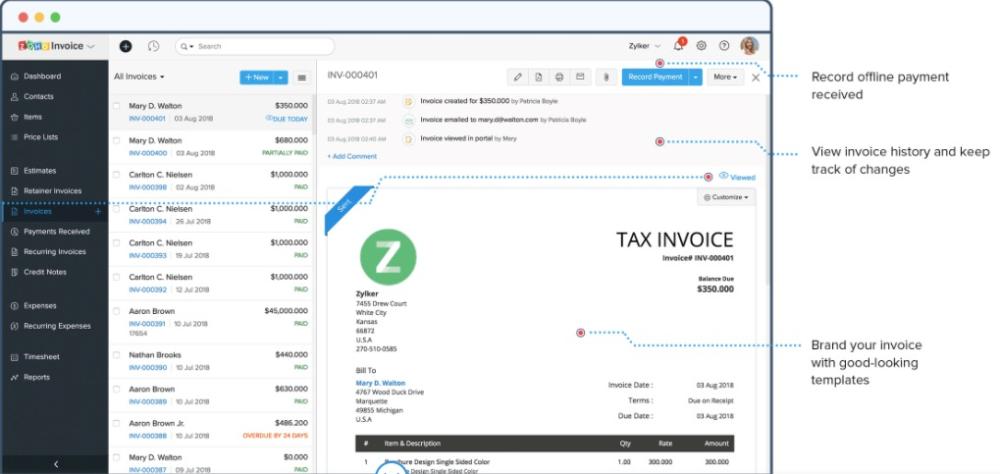
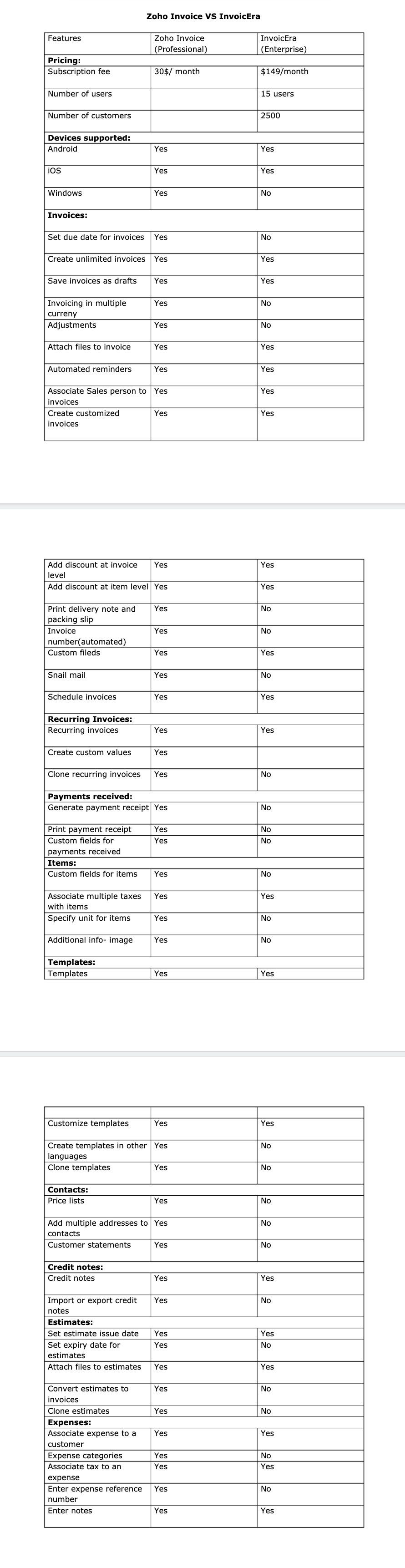
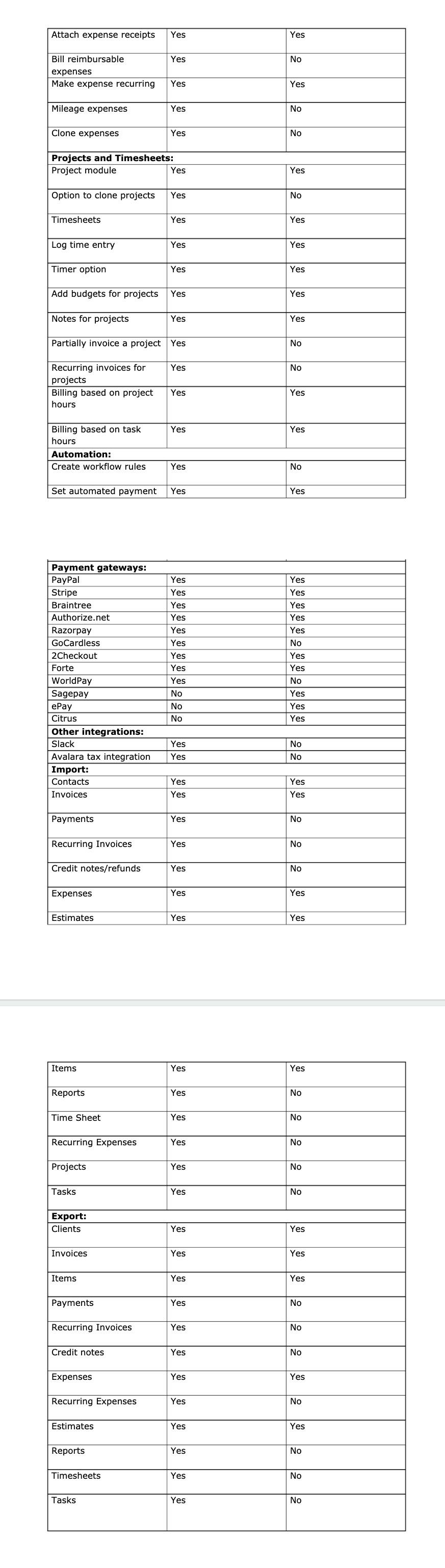
Zoho Invoice is a powerful tool that has been consistently gaining market share because it lets you send professional invoices, automate payment reminders, and accept card payments online, faster than ever! but what really sets Zoho Invoice apart is a large number of features it offers vs its main competitors not to mention the price. Below are just a few features to highlight along with a detail list of comparative features vs Invoicera.

Brand your invoices

Choose a template from our gallery and give it a personal touch. Zoho Invoice lets you carefully craft your invoices to fit your brand.

Create multilingual and multicurrency invoices

Send invoices to your customers in their currency, make base currency adjustments, and easily analyze the revalued balances. Zoho Invoice is also multilingual and speaks 10 languages. (German, Spanish, French, Italian, Chinese, Dutch, Portuguese, Brazilian Portuguese, Swedish, Japanese)

Sign your invoices

Use your digital signature to prevent invoice forgery or tampering. Our Zoho Sign integration ensures the highest level of security, compliant with ESIGN and eIDAS e-signature laws.

Send your invoice by mail

Zoho Invoice professionally prints your invoices, seals them in envelopes and mails them to your customers for you.

Set invoices on autopilot

Set up a recurring billing profile, bill and charge your customers automatically.

Print and share invoice with ease

Create clones, print out a copy, or simply share invoice over email with your team and collaborate better.

Get real-time invoice reports

Run real-time reports on your sales, expenses and tax summary. You can also schedule key reports and receive them automatically by email.
Creator-Scripts-Zoho-Invoice
Creator-Scripts-Invoicera-zoho-invoice

Friday, November 23, 2018

Create, capture, and measure with the new Facebook Lead Gen features in Zoho Social

Ever since we introduced Facebook Lead Ads integration in Zoho Social, we’ve been taking copious notes from you. Up until now, you could have only a few standard form fields flowing into your CRM. This meant you missed out on the other prefilled data and custom questions that Facebook offers. So we set out to tighten this integration and debut highly requested features that go beyond the basic updates.
Without further ado, here’s what it means for you:
Capture everything that matters to you, in real time Facebook lets you collect as many as 20 types of prefilled data through lead forms—from the standard CRM fields such as name, e-mail, and phone number to Facebook-specific ones like relationship status and custom questions. As the saying goes, with more data comes more responsibility to keep your CRM clean and free from redundancy. There’s always a high chance that your Facebook fields reside in your CRM with a different label.
Let’s say that you want to capture the birthday of your target Facebook audience, while your CRM stores this data in a field called Date of Birth (you’re right, it’s a potato-potahto problem). How do you make sure fields from Facebook are matched to the right fields in CRM? Moreover, every time you run a new lead ad, you’d have to make sure you aren’t tampering with the fields in CRM—the basic nightmare of every sales rep! Seems like a dicey situation? Well, we’ve got your back! Now, you can manage the mapping of form fields from an exclusive tab called Lead Forms.
Once you link your Facebook ad account with Zoho Social, we’ll look up fields in yourCRM’s Leads module and map the standard fields automatically. You can go ahead with automatic mapping, or edit it to your taste. If you don’t find a relevant field to map, you can create a new one in CRM straightaway.
Furthermore, you can choose to keep all forms, or just specific ones, in sync with CRM.
Bring relevant campaign details into the big picture One of the prerequisites for lead nurturing is having the right set of criteria to define your sales workflows. This is possible only when you go beyond knowing the name and e-mail address of your leads. Where do they live? What products do they like? Which ad campaign did they come from?
When we began working on this update, we realized that these additional data points from your lead gen campaign are just as important. For instance, sales reps might want to follow up on leads who give a favorable response to one of the survey questions you’ve asked. Sales admins might want to assign leads generated from specific ad sets to reps working in different time zones.
Now you can edit the mapping of fields, like Facebook Page, Ad Campaign, Ad Set, and Lead Form, right down to your Ad Account details.
Sync organic leads from your lead forms Those of you who’ve extensively run lead ads will remember the times your form surprised you with organic leads (beyond your target audience). However, the lead count in your Ads Manager never gave even the slightest hint of organic leads. Going forward, you can easily find out the paid and organic leads from Facebook campaigns, provided you’ve created a field called Lead Type in your Leads module.
Run new lead gen campaigns and track results With this addition, you should find yourself making fewer trips to your Facebook Ads Manager. Keep track of the leads in sync with CRM, the status of all your lead gen ad campaigns and forms, and run lead ads—all under one roof. And, of course, the most notable change would be all of this in an all-new product design.
We’re constantly looking to improve this integration—and more—with your feedback. Have questions, comments, or ideas to share? Tweet to us @CreatorScripts.